

Paper Ink Blog
Google Review QR Stickers: Placement, Size, and Material Guide for Saudi Businesses

Short answer: The best Google review sticker is a die-cut vinyl sticker around 8–10 cm, placed at the checkout counter or exit at eye level. Vinyl holds up to daily handling and wiping, while plain paper tears or fades within weeks of the same use.
Most guidance on Google review stickers online falls into two camps: free QR code generators, or generic marketing tips about asking for reviews. Neither answers the practical question a small business owner faces after generating the code: what size actually works above a checkout counter, what material survives daily wiping, and does a sticker on glass need something different from one on a wooden table? That is a print and material decision, not a code-generator decision — and it is what actually determines whether a customer pulls out their phone or ignores the sticker entirely.
Before the Sticker: Make Sure Your Business Profile Is Ready
The sticker is just a delivery method — it has to point to an active, verified Google Business Profile under your correct business name. If your listing is not claimed yet, do that first; printing a sticker that leads to a broken or unclaimed page wastes the entire batch. Google itself provides a free official tool to generate a review link or QR code directly from the Google Business Profile Help Center — a five-minute check that saves a full reprint later.
Where Exactly Should You Place It? Three Tested Spots
At the checkout counter: the highest scan rate, because the customer is standing with a free moment and usually already holding their phone to pay. Needs a material that handles daily friction and counter wiping.
Near the exit or storefront glass: catches the customer on their way out, often in a better mood after a good experience — a stronger psychological moment than the register itself for some businesses like restaurants and salons. Needs a slightly larger size since the viewing distance is longer.
On the table or a small stand (cafés and restaurants): works well for a seated customer with time to scan calmly, but it is exposed to spills more than any other spot — it needs a genuinely water-resistant material, not just a standard sticker.
For smaller businesses like clinics or salons, the waiting area and the checkout point together often work best — a waiting customer has time to scan without feeling rushed.
Where should a Google review sticker go for the most scans? In short: checkout counters get the highest scan rate because customers already have their phone out, exits catch a positive mood on the way out, and tables need water-resistant material more than any other spot.
Size and Material by Placement
| Placement | Suggested size | Best material | Why |
|---|---|---|---|
| Checkout counter | 8×8 cm | Die-cut vinyl, matte finish | Handles daily touching and wiping |
| Exit / storefront glass | 10×15 cm | Static cling or vinyl | Visible from further away, no adhesive residue on glass |
| Table or acrylic stand | 5×5 cm | Glossy, water-resistant vinyl | Survives spills, stays legible up close |
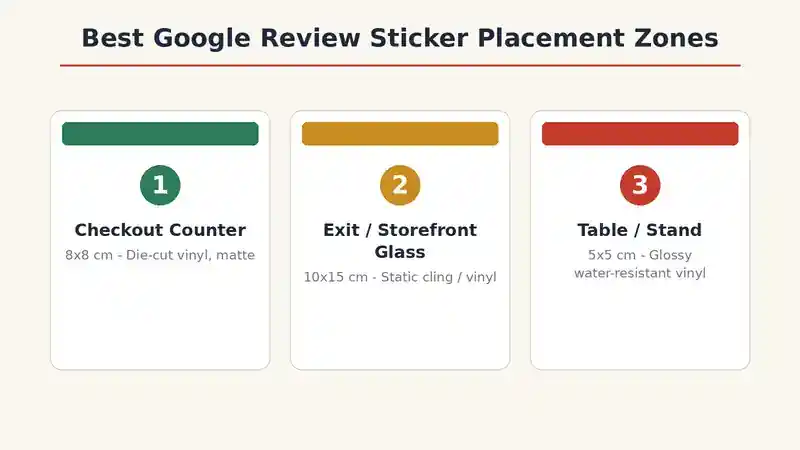
Die-cut vinyl stickers are the standard choice here because they hold up to daily touching and cleaning far better than plain paper — the same vinyl sticker printing most small stores already use for other packaging labels.
Designing the Sticker Itself
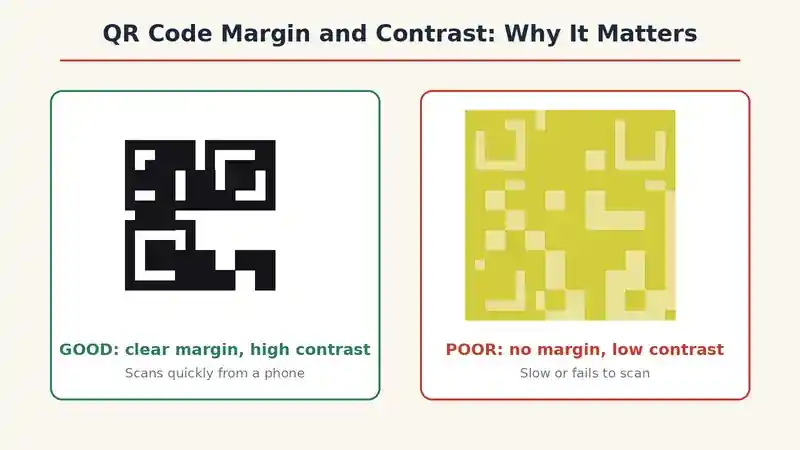
The code alone is not enough — the sticker needs a short, direct line above the code, like “Rate us on Google” or “We’d love your feedback,” in a font large enough to read from about a meter away. Leave enough white space (quiet zone) around the code itself; most scanning apps need a clear margin to recognize it quickly. Contrast matters too: a dark QR code on a light background scans faster than a colored code on a dark background.
One Rule Google Enforces: Never Pay for a Review
Offering a discount, gift, or any incentive specifically in exchange for a review violates Google’s policies for reviews, and can lead to removed reviews or a penalized listing if discovered. Ask for honest feedback, not a paid one.
How Do You Know If It Is Actually Working?
You do not need complex analytics to measure this. Track new reviews on your Business Profile over the first two months after placing the sticker, and compare that to your usual rate before printing. A clear increase means the placement and design are working. If nothing changes after trying more than one spot, the issue is usually visibility or wording, not the idea itself — try repositioning before giving up on it.
If you run more than one branch with a separate code per location as recommended above, compare review rates branch by branch. A clear gap between two branches with the same design and size usually points to a difference in actual in-store placement, not the design.
Common Mistakes When Printing a Google Review Sticker
Printing on plain paper instead of a durable material: it tears or smudges within weeks of repeated touching and wiping, forcing a reprint sooner than expected.
Placing it far from checkout or the exit: every extra step a customer has to take to reach the sticker lowers the odds they actually scan it.
Not testing the code before printing the full batch: a broken or expired link means the entire print run is wasted.
Choosing a size that is too small: hard to scan quickly from a phone, especially under weak indoor lighting.
Reusing the exact same design across every branch: makes it harder to later tell which specific branch actually needs a service improvement based on its reviews.
Checklist Before You Print
- Confirmed your Google Business Profile is claimed and active
- Tested the QR code on two different phones before printing the full batch
- Decided the placement (checkout, exit, or table) before choosing size and material
- Chose a material suited to that specific spot (water-resistant vinyl for tables specifically)
- Added a separate code per branch if you operate more than one location
FAQ
Do Google review QR codes expire?
No, as long as your Business Profile on Google Maps stays active and the linked page does not change.
Can I use the same sticker across multiple branches?
It is not recommended — each branch should have its own code pointing to its specific Google Maps listing, not a shared general page.
What is the difference between a static and a dynamic QR code?
A static code prints the link directly and never changes; a dynamic one lets you update the destination later but requires a subscription to an external tool to manage it.
Is a glossy or matte sticker better?
It depends on lighting — glossy can reflect strong overhead light and become harder to scan, while matte is usually clearer to scan in most retail settings.
Bringing It Together
An effective Google review sticker is not just a code printed on any paper — it is a placement, material, and size decision that actually determines how many customers pull out their phone instead of ignoring it. Paper-Ink can help you choose the right material and size for your specific location. For more on getting your printed material right for daily handling, see our guide on packaging checklist for small online sellers, or browse our sticker printing options. If you are ready to print review stickers in a material built for daily use, request a quote or reach us directly on WhatsApp.
