

Gaming Posters: How to Choose Video Game Wall Art That Still Looks Good at Night
Short answer: choose gaming posters that match one clear theme, size them to your screen (roughly as wide as your monitor for a single piece above it), and prefer licensed or original art. Most importantly, think about when you play: if it’s mostly at night with the lights down, a printed poster disappears, while illuminated video game wall art stays visible.
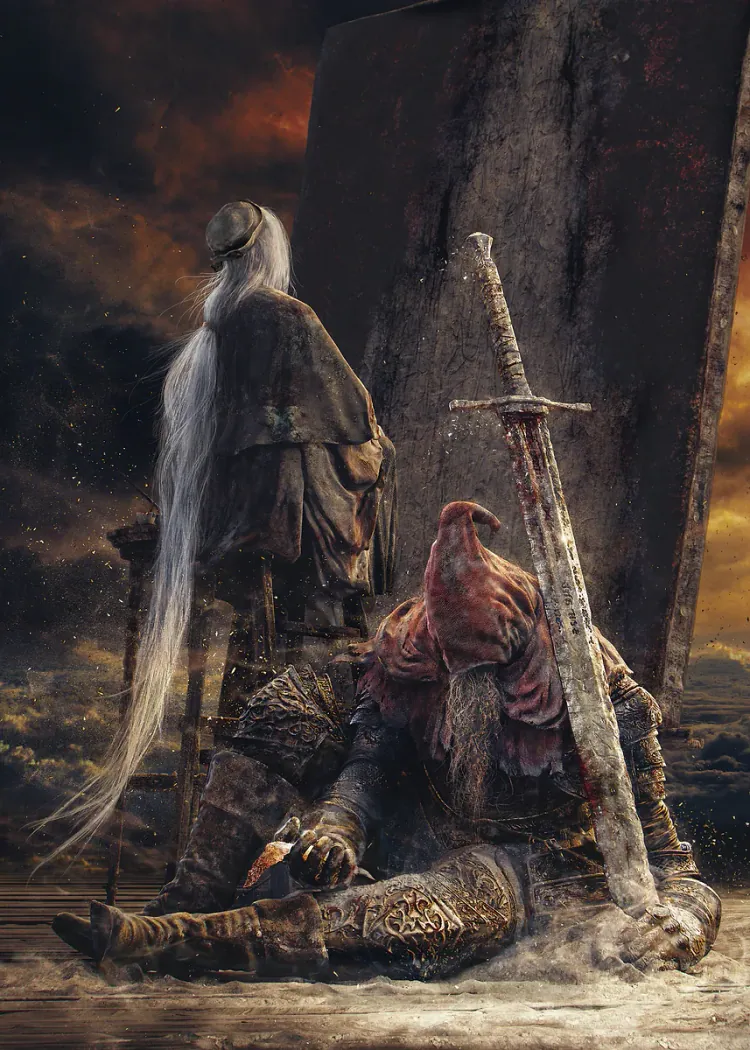
A good gaming poster does two jobs: it shows what you love and it makes the room feel finished. The first part is easy. The second is where most gamer room decor goes wrong, with too many small prints, the wrong size, or art that vanishes once the RGB is the only light on.
Pick a theme before you pick a poster
A gamer room theme holds everything together. Choose one:
| Theme | Colours | Works with | Example designs |
|---|---|---|---|
| Cyberpunk / neon | Magenta, cyan, black | RGB keyboards and strips | Night City, neon streets |
| Dark fantasy | Deep greys, gold, red | Wood desks, warm light | Elden Ring, The Witcher |
| Military shooter | Olive, black, muted tones | Minimal setups | Call of Duty, tactical art |
| Retro / arcade | Bright primaries, pixel art | White or pastel rooms | Retro gaming posters, arcade scenes |
| Horror / indie | Dark with one accent colour | Small rooms, dim light | A Five Nights at Freddy’s poster or another FNAF poster style piece |
Once the theme is set, every poster, shelf item and light should fit it. That is the difference between gaming decor and a random collection.
Sizing gaming posters to your setup
| Setup | Single poster above the screen | Beside the screen |
|---|---|---|
| 24-inch monitor | About 30–35 cm wide | One portrait poster, 30–40 cm wide |
| 27-inch monitor | About 35–45 cm wide | One or two portraits |
| Dual monitors | Wide piece or two posters, one above each | Keep sides clear to avoid clutter |
| TV console setup | Beside the TV, not above if it reflects | Portrait pieces at eye level |
Leave a gap of at least 15–20 cm between the screen top and the poster so the art doesn’t crowd the display.
For A-size charts, paper and finish that apply to any print, see our guide to poster sizes and quality.
Licensed art, fan art and original designs
Computer game posters range from official key art to fan illustrations. Official art is sold through licensed stores; fan art is common on print marketplaces and quality varies widely. If you want something no one else has, commission an original piece or use your own design. Some artists in the region go further: Saudi artist Jewmana Al-Jifri has adapted video-game characters with mosques, Arabian falcons and Arabic typography (Arab News). That kind of local twist makes a gaming wall feel personal.
Popular video game posters right now
Titles with strong, recognisable art make the best video game posters:
- Elden Ring poster: dramatic silhouettes and gold light suit dark fantasy rooms.
- Call of Duty: a strong character like Ghost reads well even from across the room.
- The Witcher: misty landscapes and muted colours for calmer setups.
- Cyberpunk 2077: neon cityscapes that match RGB lighting.
- Retro titles: pixel art and arcade scenes for a playful, lighter room.
How gaming posters behave in a dark room
Here’s the problem nobody mentions: most people game in the evening with the room lights low. A printed poster under those conditions is barely visible. There are three fixes:
- Light the poster: a small spotlight or picture light, which adds glare risk near screens.
- Use gaming lights around it: LED strips create a glow on the wall, but the poster itself stays dark.
- Choose illuminated gaming wall art (LED lighting built in): illuminated art where the image itself glows.
Option 3 is the only one where the artwork stays the focus after dark. For how these approaches differ, see our illuminated wall art guide.
Where to hang gaming posters
- Above the monitor if there’s at least 15–20 cm clearance.
- Beside the desk at eye level when seated, for pieces you want to see mid-game.
- Behind you if you stream; it becomes your on-camera background.
For full room planning, including screen distance and bias lighting, read our gaming room setup guide. For wall layouts that mix gaming and anime, see gaming and anime wall art ideas.
Frame, board or illuminated: finishing options
How a poster is finished changes how it looks on a gaming wall:
| Finish | Look | Best for | Watch for |
|---|---|---|---|
| Unframed paper | Casual, easy to change | Dorms and rotating collections | Curling corners, fading near windows |
| Framed poster | Clean, finished | Main focal piece | Glass glare opposite a screen |
| Metal or board print | Sleek, rigid | Minimal setups | Reflections under RGB |
| Illuminated art | Printed by day, glowing at night | Rooms used mostly in the evening | Needs a socket nearby |
If your desk faces a window, avoid glass frames directly behind you: they reflect the screen and the sky in camera shots. Matte finishes and illuminated pieces avoid most of that.
Gaming posters as gifts
Gaming posters are one of the safest gifts for gamers, as long as you know the game. If you don’t, ask which title they’ve played most this year, or check with someone who plays with them. A poster from the right game shows you pay attention; a generic “gamer” slogan rarely does. For more ideas at every budget, see our gaming gift ideas.
Common mistakes
- Too many small posters. One focal piece plus two supporting ones looks deliberate.
- Mixing themes. A pastel retro print next to a dark shooter poster fights for attention.
- Hanging too close to the screen. It crowds the display and reflects light.
- Low-quality fan prints. Pixelated edges show at close range.
- Forgetting night use. Test the wall with your gaming lights on.
How LumiPoster fits gaming posters
LumiPoster is gaming wall art that stays visible when you play. Switched off, it looks like a clean full-bleed poster with no visible frame. Switched on, the whole artwork glows evenly from inside, turning your favourite game into the room’s accent light. It isn’t an LED border, a neon outline or another screen, so it adds atmosphere without adding distraction. The gaming collection covers many titles, and you can use your own artwork if you have the rights to it.
Verified on 2026-09-28: 270 SAR · 32 × 48 cm portrait · about 2 business days to prepare and 3 to deliver · free delivery across Saudi Arabia · 1-year warranty.
Recommended LumiPoster designs
- Elden Ring — At the Sword. Dark fantasy with gold highlights that glow at night. See it lit.
- Ghost — Call of Duty. Bold character art for minimal shooter setups. View the design.
- The Witcher — Geralt in the Mist. Calm, moody art for warm-lit rooms. Check it out.
- Johnny Silverhand. Cyberpunk colours that match RGB lighting. See it with your setup.
Browse more in the gaming collection or the combined gaming and anime collections.
FAQ
What size should gaming posters be?
For a single poster above a 27-inch monitor, about 35–45 cm wide. A 32 × 48 cm portrait piece fits beside or above most single-screen setups.
What posters should I put in a gaming room?
Pick one theme and choose art from games you actually play; one focal piece plus two supporting items is enough.
How do I hang posters without damaging the wall?
Use removable adhesive strips rated for the weight, or a single hook for framed or rigid pieces.
Are retro gaming posters still popular?
Yes, especially pixel-art and arcade designs for lighter, playful rooms.
Do gaming lights make posters visible at night?
LED strips light the wall around a poster, not the poster itself. Illuminated art is the way to keep the image visible.
Can I print my own game artwork?
Yes, if you own the rights. Fan art and official art belong to their creators.
Explore gaming designs
Choose your theme, size it to your screen, then explore gaming LumiPoster designs. Anime fans can jump to anime posters.
Sources: Arab News — Saudi artist adapts video-game heroes · Paper Ink product data (read 2026-09-28)
